Intelligent Appointment Scheduling System
Client
Supriya Chaudhary
Year
2025
Tech stack
Python, Streamlit, pandas, NumPy, Plotly, SMTP email (Gmail and Outlook), CSV and JSON data storage, SHA-256 authentication
About
An appointment scheduling tool for solo service businesses like home salons, tutors, and mobile hairdressers. It studies past booking data to find the busy days and times, then recommends the best slots to open each month. Owners manage the schedule and customers book online.
The Problem
Solo service business owners such as mobile hairdressers, home salon operators, private tutors, and repair technicians usually keep their calendar open all day, every working day, and simply wait for bookings to come in. This wastes time. Quiet slots sit empty while the owner stays available, and busy periods get crowded with back to back jobs that run over and leave no room to travel or reset.
Most of these owners already have months or years of booking history sitting in a spreadsheet, but they have no easy way to turn that history into a plan. They cannot see which days and times actually bring in reliable customers, which slots get cancelled again and again, or how demand shifts from season to season. Big scheduling platforms are built for teams and subscriptions, not for one person who just wants to know when to open their diary.
What I Built
I built a data driven scheduling system that reads a business's historical booking records and works out the strongest time slots for any month ahead. The system has two sides. The owner side is a private dashboard for analysing demand, generating a recommended monthly schedule, adjusting it by hand, and publishing it. The customer side is a public website where clients see the open slots for the published month and book an appointment, with an automatic confirmation email.
The core idea being tested is simple. Does a schedule shaped by real customer behaviour perform better than a fixed always open schedule? The system includes a simulation engine that runs synthetic bookings through both models and produces side by side performance numbers, so the difference can be measured rather than guessed.
It was developed as an MSc Information Technology dissertation project at the University of the West of Scotland, and it ships with 1,919 records of realistic sample data so it runs straight away.
Key Features
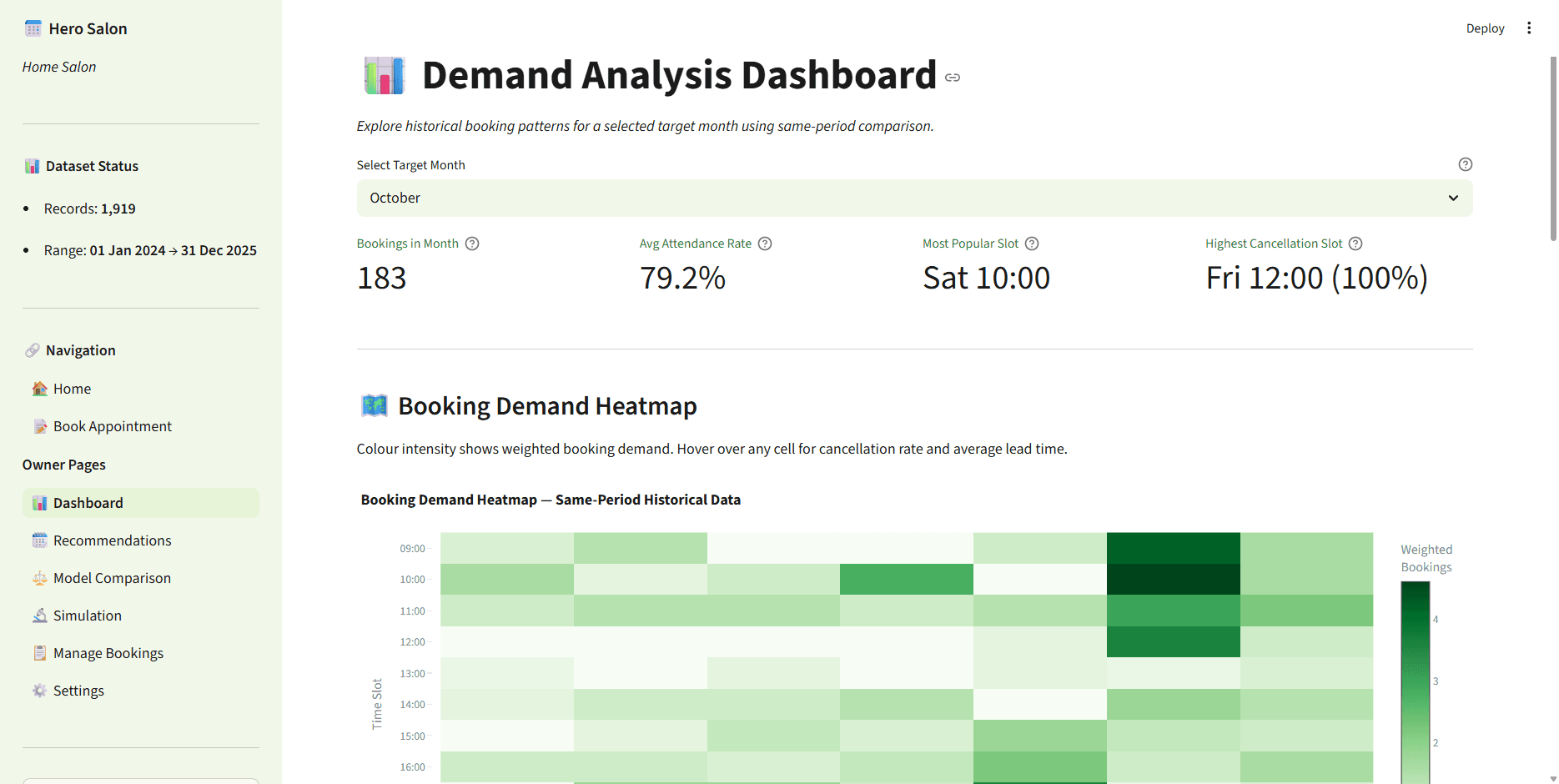
Demand analysis dashboard with an interactive heatmap of bookings by day and time, plus cancellation rates and lead times on hover
Slot quality scoring that rates every day and time using demand volume, customer variety, cancellation reliability, and no-show rate
Monthly schedule generator that turns past demand into a ready to publish weekly template for any target month
Buffer slot protection that automatically blocks the slot after a long appointment to guarantee a preparation gap
Fixed versus behaviour based comparison that shows how a static schedule performs against the smart one
Simulation engine that runs synthetic booking requests through both models over a chosen number of weeks and returns repeatable metrics
Public customer booking portal where clients view open slots, book, and cancel using a reference number
Automatic HTML confirmation and cancellation emails sent over SMTP with Gmail and Outlook support
Secure owner login with hashed passwords, session control, and a five attempt lockout
Dataset update workflow that merges new portal bookings back into the history so future recommendations keep improving
Project Details
How it works through the main features
The system starts with a single historical dataset of past bookings. When the owner opens the dashboard and picks a target month, the analysis engine filters the history to that same month across all recorded years. This is called same period comparison, and it matters because analysing every month together would blur out seasonal patterns. March demand should be planned from past March data, not from a yearly average.
Every day and time slot is then given a quality score using a weighted formula. Demand frequency counts for 40 percent, customer diversity for 25 percent, reliability for 20 percent, and attendance for 15 percent. Reliability drops when a slot is cancelled often, and attendance drops when customers do not show up. Recent behaviour carries more weight than older behaviour, with the most recent year weighted at 0.6 and all earlier years sharing 0.4. Slots above 0.65 are marked recommended and shown green, slots between 0.40 and 0.65 are marginal and shown amber, and anything below 0.40 is not recommended and shown red.
The schedule generator takes those scores and builds a weekly template for the chosen month. Green slots open automatically. Amber slots only open on the naturally busy days, Friday and Saturday, so quieter days do not get flooded with slots that will sit empty. If the average service at a slot runs 90 minutes or longer, the system marks the next slot as a buffer, blocks it from booking, and shows it in blue, which forces a 15 minute gap between jobs. UK bank holidays for England are worked out in code, including Easter, and flagged on the grid so the owner can choose to close those days.
The owner reviews the generated grid, flips any slots open or closed with override checkboxes, and clicks publish. The published schedule is saved and the customer booking portal instantly shows those slots as available. Customers pick a week, choose a green slot, enter their details, and confirm. A confirmation email goes out with a booking reference, and a failed email never blocks the booking from being saved. Cancellations work the same way using the reference number.
The comparison and simulation pages exist to prove the approach. The simulation engine generates synthetic booking requests and runs them through both the fixed schedule and the behaviour based schedule over a configurable number of weeks, then reports metrics for each so the two can be compared directly.
At the end of each month the owner marks attendance for completed appointments and clicks update dataset, which merges the confirmed portal bookings into the main history. The next month's recommendations are then based on more data, so the system gets sharper over time.
What it needs
Python 3.10 or higher, the packages in requirements.txt (Streamlit, pandas, NumPy, Plotly), and a booking history CSV. Sample data with 1,919 records is included, so nothing extra is required to try it. Email confirmations are optional and need a Gmail app password or an Outlook account.
Summary
This is a complete working scheduling product for a one person service business, wrapped around a research question. It replaces the guesswork of an always open diary with a monthly schedule built from real customer behaviour, gives the owner a full dashboard to understand and control that schedule, and gives customers a clean way to book online. Because published bookings feed back into the history, the recommendations improve every month.
Screenshots
The Result
The finished system delivers a full owner dashboard and a public booking site in one application, running on a real dataset of 1,919 bookings. It produces a scored, colour coded schedule grid for any month, protects the owner's time with automatic buffer gaps, respects seasonal and day of week demand patterns, and sends booking confirmations by email. The built in simulation engine lets the behaviour based schedule be measured against a fixed schedule with reproducible numbers, which is the evidence the dissertation set out to gather. It is a prototype by design, using CSV storage and a single business profile, with a clear path to a database backed multi tenant version for production use.